

MacBook Won't Charge Even With a New Charger? It Could Be the Logic Board
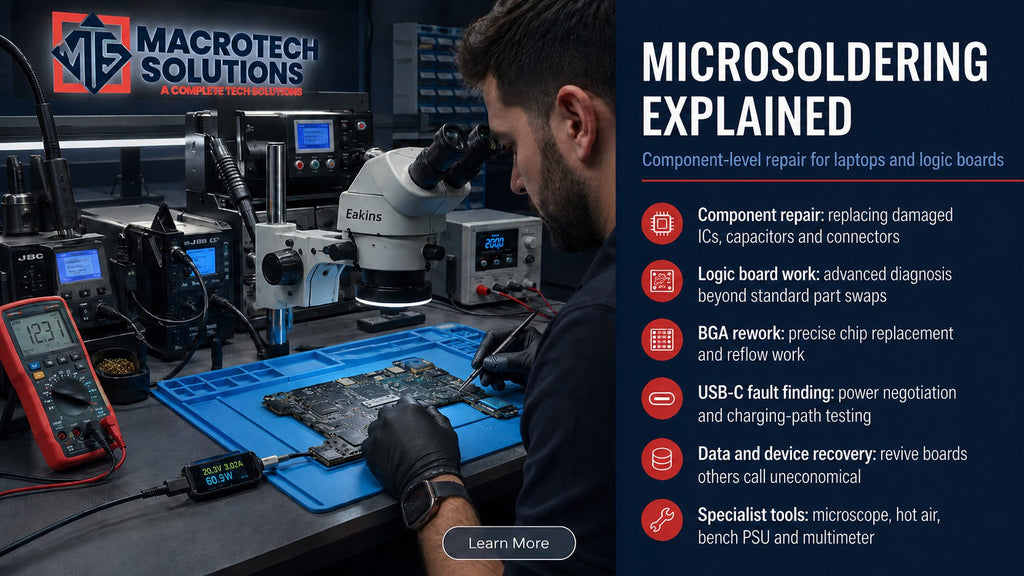
If your MacBook still won't charge after you've bought a new charger — and maybe even a new battery — the problem almost certainly isn't the thing you just replaced. When the "easy" fixes don't work, the fault usually sits deeper: on the logic board itself, in the small chip that controls whether charging happens at all.
When "Just Buy a New Charger" Doesn't Fix It
Most charging problems really are simple. A worn-out cable, a cheap third-party adapter, or a battery that's reached the end of its usable life account for the majority of "my MacBook won't charge" cases we see — that's why we've written about laptop charging basics, how a bad USB-C charger can damage a charging circuit, and why some MacBooks deliberately stop at 80% before.
This article is for the smaller — but more frustrating — group of cases: you've already tried a genuine Apple charger, a known-good cable, and the battery still shows no sign of charging (or charges intermittently, or the charging light behaves oddly). At that point, the fault has usually moved from "consumable part" to "logic board component," and no amount of charger-swapping will fix it.
A Quick Recap — What's Supposed to Happen When You Plug In
When you connect power, the MacBook doesn't just pass electricity straight to the battery. The charger negotiates a voltage with the laptop over USB-C Power Delivery, that power passes through input protection circuitry, and a dedicated management chip on the logic board decides how much current the battery is allowed to receive, monitors temperature and voltage, and reports charging status back to macOS. If any link in that chain fails, macOS can show a "Not Charging" status, no status at all, or charging that starts and stops — even though the charger itself is working perfectly.
Meet the Charging IC: The Chip That Decides Whether Charging Happens At All
Which chip, on which MacBooks
The exact component varies by model generation. Older unibody and Retina-era MacBooks (roughly 2010–2015) generally use Intersil's ISL6259 battery-charger controller. USB-C models from around 2015 onward moved to a combination of a USB-C power-delivery controller (in the CD32xx family) and the ISL9240-series charging IC, working alongside dedicated current-sensing resistors and protection MOSFETs. Apple Silicon MacBooks use updated equivalents of the same basic architecture. The naming changes across generations, but the job is the same: gatekeeper between "power is present" and "the battery is actually charging."
Why this chip fails
These charging ICs sit directly in the path of every plug-in event, which makes them one of the most electrically stressed components on the board. Common failure triggers include:
- Liquid spills that reach the charging circuit, even briefly, and cause slow corrosion over weeks or months
- A short or voltage spike from a damaged, non-compliant or counterfeit charger or cable
- A blown current-sensing resistor near the chip, which can cause the whole circuit to shut itself down as a protection measure — even though the resistor itself is a tiny, inexpensive part
- General component fatigue after many years of daily charge cycles
Signs the Fault Is the Charging Circuit, Not the Charger or Battery
None of these signs are a certain diagnosis on their own — that's what proper bench diagnostics are for — but together they're a strong indicator the fault has moved to the logic board:
- A genuine Apple charger and cable, tested on another MacBook and known to work, still won't charge this one
- The charging light or on-screen battery icon behaves inconsistently — sometimes lighting up briefly, sometimes not at all
- The MacBook runs fine on battery, or fine while plugged in, but the battery percentage never actually climbs
- A replacement battery (fitted elsewhere or by another shop) didn't resolve the issue
- The fault appeared shortly after a liquid spill, a knock, or using a non-Apple charger
Why This Fault Gets Misdiagnosed So Often
Because the symptom — "won't charge" — looks identical whether the cause is a $30 cable or a $0.02 resistor on the logic board, it's very easy to spend money on parts that were never the problem. We regularly see customers who've already bought a second or third charger, or paid for a battery replacement elsewhere, before the fault is correctly traced back to the board. That's the exact scenario board-level diagnostics exist to prevent.
Can a MacBook Charging IC Actually Be Repaired?
Component-level repair vs whole logic-board replacement
In many cases, yes — a failed charging IC, a blown current-sensing resistor, or a damaged protection MOSFET can be replaced individually using microsoldering, without replacing the entire logic board. This is exactly the kind of work we describe in our microsoldering explainer and our logic-board failure guide — it's generally far less expensive than a full board swap, because you're replacing a single faulty part rather than the whole assembly.
When it's not worth repairing
Component-level repair isn't always the right call. If liquid damage has spread corrosion across multiple areas of the board, or the specific chip package is unusually difficult to rework without risking nearby components, a full logic-board replacement — or in some cases, deciding the repair isn't economical at all — can be the more sensible outcome. We cover how to weigh that decision in our repair-or-replace decision guide. Either way, you'll always get a written, itemised quote before any work goes ahead.
What Diagnosis Actually Involves at Macrotech
Rather than guessing from symptoms, our technicians test the charging circuit directly on the bench: checking voltage at test points along the power path, using a multimeter and — where needed — thermal imaging to isolate exactly which component along the charging chain has failed, before any part is ordered or any work begins. That's the difference between component-level diagnostics and simply swapping the whole board "to be safe."
Local to Carrum Downs, Frankston or the Bay-Side Suburbs?
We're based at 50 Titan Drive, Carrum Downs, and see this exact fault pattern regularly from customers across Frankston, Seaford, Langwarrin and Skye, and Patterson Lakes. Same-day diagnostics are available on most devices, with a written quote before any repair goes ahead. See our full Apple Mac repair services for more on our logic-board and microsoldering capability.
Frequently Asked Questions
My MacBook's charging light doesn't come on at all — is that definitely the charging IC?
Not necessarily — it can also point to a damaged USB-C port, a faulty cable, or (on some models) an internal fuse. It's one of several possible causes with an identical symptom, which is exactly why bench-level testing rather than guesswork is the reliable way to confirm it.
Can I test or fix a charging IC fault myself?
Testing requires a multimeter and knowledge of the specific board's test points, and repair requires professional microsoldering equipment capable of handling small, heat-sensitive components without damaging the surrounding board. We don't recommend DIY attempts on this specific fault — it's easy to turn a repairable component-level issue into a full board replacement.
Will this be covered under Apple warranty or AppleCare?
It depends on your device's warranty status and the cause of the fault (for example, liquid damage is typically excluded from standard warranty). Check your coverage with Apple directly, or ask us to help confirm your device's warranty status before you book a diagnostic with us.
How much does MacBook charging IC repair cost?
It depends on which component has failed and how accessible it is. A $50 diagnostic fee applies to identify the exact fault; if you proceed with the repair, that fee is waived and you'll receive a written, itemised quote before any work begins.
Is my data safe during a logic-board or charging repair?
In most charging-circuit repairs, the storage drive isn't touched at all, so your data is generally unaffected. We'll always tell you upfront if a specific repair carries any risk to stored data before you approve it.
Charger and battery both fine, but your MacBook still won't charge?
Book a Diagnostic — $50, Waived If You RepairMacrotech Solutions is an independent repair service and is not affiliated with Apple Inc. Component names and part numbers referenced (e.g. ISL6259, ISL9240) are used for technical accuracy and are trademarks of their respective owners.