

Microsoldering Explained: How Component-Level Repair Saves "Unfixable" Laptops and MacBooks
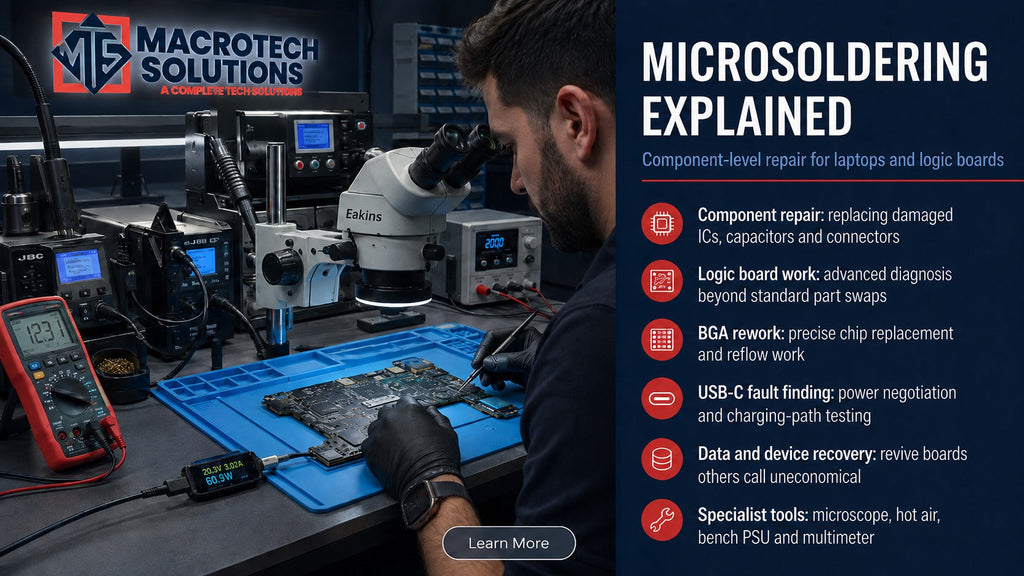
If you've been told your MacBook or laptop needs a full logic-board or motherboard replacement — and quoted several hundred dollars for it — there's often a cheaper, more targeted option most repairers don't mention: microsoldering. Here's what it actually is, what it can and can't fix, and how to tell if it's worth it for your device.
What Microsoldering Actually Means
Microsoldering is soldering at a scale you can't do with an ordinary iron and a steady hand. Modern laptop and MacBook motherboards pack their chips, capacitors and connectors into a space smaller than a credit card, with many components attached using Ball Grid Array (BGA) packaging — arrays of tiny solder balls hidden underneath the chip rather than pins you can see and touch.
Working at this level requires a specific bench setup: a stereo microscope (typically 7x–40x magnification) to see what you're doing, a hot-air rework station that delivers precisely controlled heat to lift and reseat a single chip without disturbing anything around it, and a preheater to bring the board up to a stable working temperature first. This is a different skillset — and a different equipment investment — to swapping a screen, battery or keyboard.
Component-Level Repair vs a Full Board Swap
When a laptop or MacBook motherboard develops a fault, a repairer generally has two options: replace the entire board, or diagnose and repair the specific failed component on the existing board.
Full Board Replacement
Faster to carry out and doesn't require microscope/rework equipment, but the replacement board itself is expensive — especially genuine Apple logic boards — and you lose whatever was unique to your original board (in some MacBook models, components like storage are paired to the board at a system level).
Component-Level (Microsoldering) Repair
Targets the actual failed part — a connector, capacitor, diode or chip — rather than the whole board. It takes longer and needs specialist equipment and training, but the parts cost is a fraction of a full board, which is usually reflected in the final price.
Because component-level repair takes more time, more skill and more precise equipment, many general repair counters simply don't offer it — a full board swap is quicker to turn around, so that becomes the default answer even when the actual fault is a single, repairable part.
What Microsoldering Can Fix
Not every board fault is a candidate for component-level repair, but a good number of the most common "the whole board is dead" diagnoses come down to a single point of failure:
- Charging and USB-C port faults — a physically damaged or corroded port connector on the board, distinct from a faulty charger or cable. We cover the broader charging-fault picture in our laptop charging basics guide.
- No-power or no-boot faults caused by a blown capacitor, diode or power-management component on the board, rather than the battery or power adapter itself.
- Liquid-damage corrosion that has bridged or corroded specific tracks and components, where the rest of the board is still sound. Timing matters enormously here — see our guide on what to do with a liquid-damaged MacBook.
- GPU or CPU connection failures, where the chip itself has lost solid contact with the board (distinct from the chip being genuinely dead).
- Data-line and controller faults that stop a drive or port from being recognised, without the drive itself having failed.
Faults that generally aren't good candidates for board-level repair include a chip that has failed internally (rather than lost connection), extensive multi-point liquid corrosion left untreated for too long, or physical board damage from a drop or crush. In those cases, a full board or component replacement — or a data-recovery-first approach — is usually the more sensible path. If a chip has failed at the silicon level rather than a connection or peripheral component, board-level repair can't bring it back; that's a genuine limit of the technique, not a sales pitch.
Why This Matters When You're Told "It's Not Worth Fixing"
A "your board is dead, buy a new one" diagnosis is sometimes accurate — but it's also the fastest, lowest-effort conclusion for a repairer without component-level capability to reach. Before accepting that verdict (or a replacement-cost quote that makes repair look pointless), it's worth getting a second, board-level diagnostic opinion. The difference between "the whole board has failed" and "one connector on the board has failed" can be the difference between a write-off and a same-week repair.
We've written more broadly about when repair genuinely does and doesn't make financial sense in our repair-or-replace decision guide — microsoldering is one of the tools that shifts that calculation, because it changes what "repair" actually costs.
Microsoldering at Macrotech Solutions
Our workbench at 50 Titan Drive, Carrum Downs is set up for component-level work — stereo microscope, hot-air rework station, preheater and bench multimeter — alongside standard diagnostics. Every board-level job starts with a proper diagnostic to confirm the fault is actually a repairable component before any work (or cost) is committed, rather than jumping straight to a board-replacement quote. We see MacBook and Windows laptop owners for this from across Frankston, Cranbourne, Lyndhurst, Langwarrin, Seaford, Skye, Patterson Lakes and the wider southeast Melbourne area — often after being quoted a full board replacement elsewhere.
For the broader picture on how logic-board and motherboard faults present in the first place, see our guides to MacBook logic board failure signs and Windows laptop motherboard failure.
Been quoted a full board replacement?
Get a free diagnostic before you decide. We'll tell you honestly whether the fault is a repairable component or genuinely needs a board — no obligation either way.
Book a Free DiagnosticFrequently Asked Questions
What is microsoldering and how is it different from a normal repair?
Microsoldering is soldering and desoldering at a component level too small to work by hand with a standard iron — chips, capacitors and connectors that are often smaller than a grain of rice. It's done under a stereo microscope using a hot-air rework station, so a single failed part on the motherboard can be replaced instead of swapping the whole board.
Is microsoldering repair safe for my MacBook or laptop?
When performed by a technician trained in component-level rework with the right temperature-controlled equipment, microsoldering is a routine and safe repair method. The risk sits with the skill of the operator, not the technique itself — done incorrectly, excess heat can damage neighbouring components, which is why board-level repairs should only be attempted by technicians with proper microscope and hot-air rework equipment.
How much does microsoldering repair cost compared to a full board replacement?
It varies significantly by fault and model, so we don't quote a fixed figure without inspecting the board — but as a general rule, targeting the single failed component is usually meaningfully cheaper than a full logic-board or motherboard replacement, particularly on MacBooks where Apple's board-exchange pricing is high. Get a free diagnostic quote before deciding.
Can any repair shop do microsoldering?
No. Component-level repair needs a stereo microscope, a hot-air rework station, a preheater and a technician specifically trained in board-level diagnostics — equipment most general repair counters don't carry. Many shops default to a full board swap because it's faster and doesn't require this specialist setup, even when the underlying fault is a single component.
What issues does microsoldering fix that a standard repair can't?
Common candidates include a failed charging or USB-C port connector, a blown capacitor or diode causing a no-power or no-boot fault, corrosion damage from a liquid spill that has bridged tracks on the board, and certain GPU or CPU connection failures. These faults live on the board itself, so a straightforward parts swap (screen, battery, keyboard) won't resolve them — the board has to be diagnosed and reworked directly.
Macrotech Solutions is an independent computer and Apple device repair specialist and is not affiliated with, authorised, sponsored or endorsed by Apple, Microsoft, Dell, HP, Lenovo, ASUS, Acer, MSI, Samsung or Framework. All product names, logos and brands are property of their respective owners. This article is general information, not a diagnosis for your specific device — actual repairability depends on inspection of your board.