

MacBook Battery Warning: What "Service Recommended" Really Means (and When It's a Safety Issue)
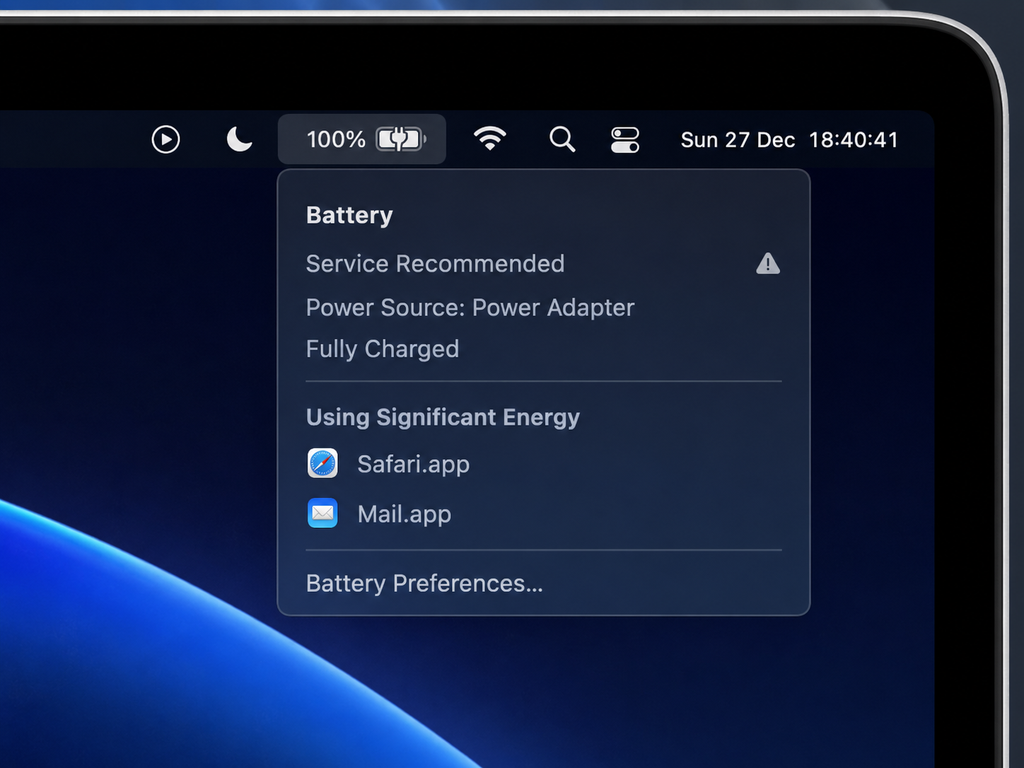
MacBook batteries don't fail without warning. Two signals usually show up first: a "Service Recommended" message under the battery icon, or — more urgently — a case that no longer sits flat on the desk. Both are worth understanding, because one is a normal part of a battery's life cycle and the other can be a genuine safety issue.
We see both scenarios regularly at our Carrum Downs workshop, and the two get confused often enough that it's worth separating them clearly.
What Does "Service Recommended" Actually Mean?
How Apple measures battery health and cycle count
If you click the battery icon in your Mac's menu bar (or check System Settings → Battery → Battery Health) and see "Service Recommended," Apple is telling you the battery's ability to hold charge has dropped below its designed threshold. According to Apple's own support documentation, this typically means the battery is retaining less than about 80% of its original capacity.
Is there a fixed percentage that triggers the warning?
Apple designs MacBook batteries to retain up to 80% of their original capacity after roughly 1,000 full charge cycles under normal conditions. A full cycle is every time you've used 100% of the battery's capacity — not necessarily in one sitting. Charging from 50% to 100% twice counts as one full cycle, for example.
Once you're under that 80% threshold, you'll likely notice shorter runtime, the laptop turning off unexpectedly at what looks like a reasonable charge percentage, or the fans working harder to compensate. None of that is dangerous on its own — it's just a battery reaching the end of its useful life, the same way a phone battery does.
Why So Many 2020–2023 MacBooks Are Showing This Warning Right Now
If your MacBook was bought new sometime between 2020 and 2023 and you've charged it most days since, 2026 is roughly when it crosses that 1,000-cycle mark. That's simple arithmetic, not a defect — a battery charged once a day for three to four years lands right around that number.
Not the same issue as the Tahoe battery-drain problem
It's worth being clear that this is a different issue to the MacBook battery drain some Tahoe users have reported after updating to macOS 26 (which we've covered separately — that's a software-side power-management issue, not battery ageing, and Apple has been shipping fixes for it through the 26.5.x updates). If your Mac is new-ish and suddenly draining fast, read our Tahoe battery-drain guide first. If your Mac is several years old and gradually losing runtime, this article is the relevant one.
How to Check Your MacBook's Battery Health Right Now
Takes under a minute:
- Click the Apple menu → System Settings
- Select Battery in the sidebar
- Click Battery Health
- You'll see your battery's condition ("Normal" or "Service Recommended") and your current cycle count
Shortcut: hold the Option key and click the battery icon in the menu bar for a quick status without opening System Settings. On older macOS versions, check About This Mac → System Report → Power instead.
Reading your cycle count
If your cycle count is above roughly 700 and the status shows "Service Recommended," plan for a replacement in the near term. Above 1,000 with that status, treat it as due now rather than later.
Which MacBook Models Are Most Likely Showing This Warning in 2026?
Based on typical cycle-accumulation timelines for a laptop charged most days since new, these are the models most commonly reaching the "Service Recommended" threshold this year:
| Model | Launch year | Typical age in 2026 |
|---|---|---|
| MacBook Air (M1) | 2020 | ~6 years |
| MacBook Pro 13-inch (M1) | 2020 | ~6 years |
| MacBook Pro 14-inch (M1 Pro/Max) | 2021 | ~5 years |
| MacBook Pro 16-inch (M1 Pro/Max) | 2021 | ~5 years |
| MacBook Air (M2) | 2022 | ~4 years |
| MacBook Pro 13-inch (M2) | 2022 | ~4 years |
| Intel MacBook models | 2017–2019 | 7–9 years |
This is a general guide based on typical usage patterns, not a guarantee — actual battery health depends on how the laptop has been charged and used, not just its age.
"Service Recommended" vs a Physically Swollen Battery — Two Different Problems
This is the distinction that actually matters for safety.
A battery reaching the end of its cycle life shows up as a software warning — the "Service Recommended" message — with no physical change to the laptop. It's an inconvenience, not a hazard, and there's no rush.
A swollen battery is a physical, mechanical problem. Lithium-ion cells can expand as they age or fail, and on a MacBook that expansion has nowhere to go — it pushes up against the trackpad and keyboard from underneath.
Signs your battery is swelling, not just ageing
- The trackpad feels raised, springy, or clicks unevenly on one side
- The bottom case no longer sits flat — it rocks slightly on a desk
- A visible gap has opened up between the case halves
- Keys near the trackpad feel stiff or don't sit level
If any of that is present, this is no longer just a "get around to it" situation.
Why swelling is a fire-safety issue, not just a performance one
A compromised lithium-ion cell can, in rare cases, enter thermal runaway — a rapid, self-sustaining heat reaction that can reach very high temperatures within seconds. It's uncommon, but it's the reason repair guides (including iFixit's widely referenced swollen-battery advice) are unusually direct about it: don't keep charging a swollen battery, don't puncture or bend it, and don't post or courier a device with a suspected swollen battery — bring it to a local technician in person.
If you notice the signs above: shut the MacBook down properly (not sleep), unplug the charger immediately, and avoid further use until it's been assessed. This isn't about causing alarm — the vast majority of ageing MacBook batteries never swell — but when it does happen, it's worth taking seriously rather than continuing to use the laptop as normal.
What To Do If You See the Warning
Battery reading low, case looks and feels normal
No urgency. It's a straightforward battery-life issue. You can keep using the Mac as-is if the reduced runtime doesn't bother you, or book a battery replacement when convenient.
Trackpad raised, case not sitting flat, or any bulging
Stop charging it, shut it down, and get it looked at promptly. Don't attempt to open the case or remove the battery yourself — MacBook batteries are glued to the top case on most modern models and require the correct solvent and tools to remove safely.
Is This Covered by an Apple Recall or AppleCare?
The 15-inch MacBook Pro recall (2015–2017 units only)
Apple has run one voluntary recall specifically for battery fire risk: certain 15-inch MacBook Pro units sold between September 2015 and February 2017, where Apple identified a genuine overheating risk and offers a free battery replacement regardless of warranty status. You can check eligibility using your serial number on Apple's official recall page. If your MacBook falls outside that specific model and date range, ordinary battery ageing and swelling are treated as a standard repair, not a recall.
When AppleCare covers a battery replacement
Separately, if your Mac is still covered by AppleCare+ and the battery is confirmed to be holding less than 80% of its original capacity, Apple will typically replace it at no charge under warranty. Outside of AppleCare, or for older/out-of-warranty machines, an independent repair centre is usually faster and more cost-effective than booking through Apple directly.
What Happens During a Professional MacBook Battery Replacement
At our workshop, a battery job starts with diagnostics to confirm it genuinely is the battery (rather than a charging-circuit or logic-board fault presenting similar symptoms — see our laptop charging basics guide for how that circuit works). If the battery is swollen, it's handled carefully to avoid puncturing the cell during removal. Once out, we test the charging circuit and connector before fitting the replacement, then run the machine through several charge cycles to confirm it's reading and charging correctly before handover.
What Does a MacBook Battery Replacement Cost?
Pricing depends on your specific MacBook model and its condition, so we don't quote a figure without seeing the machine. Every job starts with a free diagnostic and a no-obligation written quote before any work begins — you'll know the exact cost before you commit. Current indicative pricing for MacBook batteries and other common repairs is listed on our Apple repair price list.
Local Relevance — Carrum Downs & Southeast Melbourne
We're an independent repair centre at 50 Titan Drive, Carrum Downs, seeing this exact battery pattern regularly across MacBooks purchased new in 2020–2023 by customers across the region. If you're not sure whether what you're seeing is a normal end-of-life battery or something that needs urgent attention, bring it in or call ahead and describe what you're seeing — we can usually tell you over the phone whether it's urgent.
Servicing Carrum Downs, Frankston, Cranbourne, Lyndhurst, Langwarrin, Seaford, Skye, Patterson Lakes and surrounding southeast Melbourne suburbs. See our Mac repairs and MacBook repairs pages for full service details, or read what's actually happening when a MacBook won't turn on at all.
Notice your MacBook's trackpad feels raised, or you've seen a "Service Recommended" message?
Book a Battery Health CheckFrequently Asked Questions
Is a "Service Recommended" battery warning dangerous?
No — on its own, it simply means the battery has aged past about 80% of its original capacity, which is expected after roughly 1,000 charge cycles. It becomes a safety concern only if the battery is also physically swelling.
How do I know if my MacBook battery is swollen?
Common signs are a trackpad that feels raised or clicks unevenly, a case that rocks instead of sitting flat, or a visible gap between the case halves. If you notice any of these, stop charging the laptop and have it assessed.
Can I keep using my MacBook with a "Service Recommended" warning?
Yes, if there's no physical swelling. You'll just get reduced runtime until the battery is replaced. It's not a safety issue by itself.
Is my MacBook battery covered under Apple's recall?
Only if it's a 15-inch MacBook Pro sold between September 2015 and February 2017 — check your serial number on Apple's official recall page. All other models are a standard paid repair unless still covered by AppleCare+.
How long does a MacBook battery replacement take?
Most MacBook battery replacements at our workshop are same-day or next-day, depending on parts on hand for your specific model.
How do I check my MacBook's battery health and cycle count?
Go to the Apple menu → System Settings → Battery → Battery Health. You'll see whether it says "Normal" or "Service Recommended," plus your current charge-cycle count. On older macOS versions, use About This Mac → System Report → Power instead.
How much does a MacBook battery replacement cost?
It depends on your model and condition, so we provide a free diagnostic and written quote before any work begins rather than a blanket price. See our Apple repair price list for current indicative pricing.