

Fake CAPTCHA? Don't Press Windows+R — the ClickFix Scam Hitting Australian Computers
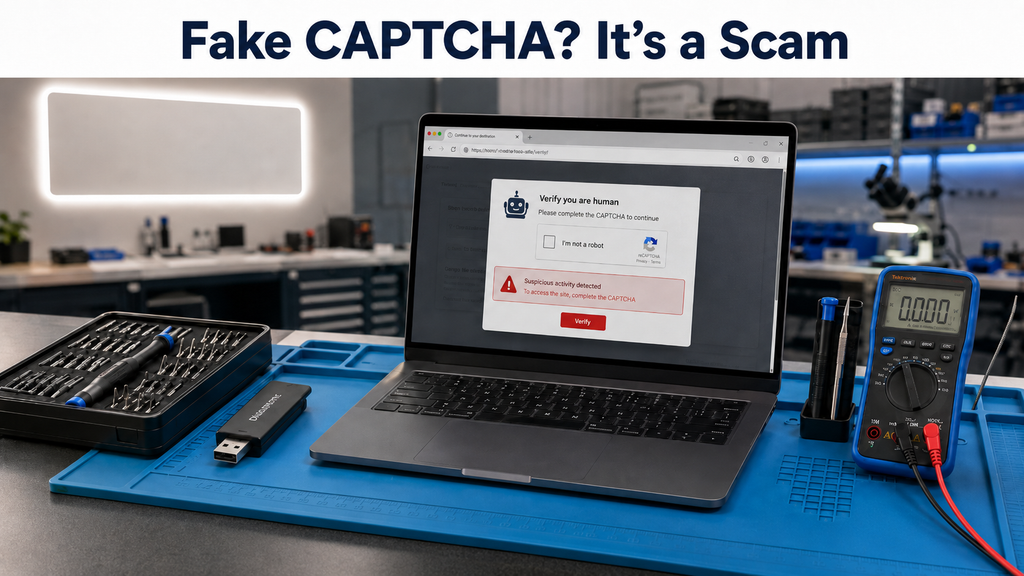
A convincing scam is doing the rounds on Australian websites right now — including hacked websites of legitimate local businesses. A page shows you what looks like a normal “verify you're human” check, then tells you to press Windows + R, paste something, and hit Enter to finish “verification”. Do that, and you've just installed password-stealing malware yourself.
This technique is called ClickFix, and it's not small. The Australian Cyber Security Centre (ACSC) has warned it's being used against Australians through compromised WordPress websites to spread Vidar Stealer, and Microsoft Threat Intelligence reports ClickFix campaigns targeting thousands of devices globally every day — on both Windows and Mac. Ready-made ClickFix “kits” are even sold to criminals as a subscription service, which is why the scam keeps appearing in new disguises.
What the ClickFix scam looks like
Microsoft's researchers have catalogued the disguises. You browse to a website — often one you've used before — and instead of the normal page you see one of these:
Fake CAPTCHA
“Verify you are human” — copied from Google reCAPTCHA or the Cloudflare check, followed by unusual “verification steps”.
Fake error page
“This page can't display correctly — click How to fix” — mimicking browser crash errors or a broken document.
Fake update prompt
“Update required to continue” — sometimes impersonating well-known brands to lower your guard.
Fake “join” verification
Spoofed Discord servers, meeting invites and login gates that “verify” you before you can join.
Where you'll run into it
Phishing emails
Fake invoices, “account problems” or government notices with a button that leads to the ClickFix page.
Dodgy ads & streaming sites
Microsoft traced one campaign to free movie-streaming sites — pressing “play” opened the scam page and delivered Lumma Stealer.
Hacked legitimate websites
The vector the ACSC has flagged in Australia: real business websites (often WordPress) quietly compromised to show the fake check.
That last one matters locally. The dangerous page isn't some dodgy download site — it can be the website of a trusted shop, tradie or community organisation. Checking that a site “looks real” doesn't protect you from this one; recognising the fake verification steps does.
How the trick actually works
Whatever the disguise, the “fix” is always the same three keystrokes:
- Press ⊞ Win + R — this opens the Windows Run dialog
- Press Ctrl + V — this pastes a command the page silently copied to your clipboard the moment you clicked “Verify”
- Press Enter — this runs the command and installs the malware
Microsoft's analysis explains why criminals moved to the Run dialog: early versions told victims to paste into PowerShell or Terminal, but those show warnings about pasted commands. The Run box shows no warning at all, and most everyday users have never seen it before — so nothing feels obviously wrong. Because you run the command, not the website, the attack can also slip past automated security software.
What the malware can do
Microsoft has observed ClickFix delivering a whole menu of payloads, not just one virus:
- Infostealers (Lumma Stealer — the most common payload — and Vidar, seen in the Australian campaign): copy your saved passwords, browser cookies and session tokens (which can bypass two-factor prompts), autofill card details and crypto wallets within minutes, then often delete themselves.
- Remote access tools (XWorm, AsyncRAT, NetSupport and others): give the attacker hands-on control of your computer — watching, browsing your files and moving to other devices on your network.
- Loaders and rootkits: quietly download more malware later, or bury themselves so deeply the system hides them from casual inspection.
- “Fileless” operation: many payloads run in memory rather than saving a program to disk — one reason a quick antivirus scan can come back clean while the damage is already done.
Mac users: you're a target too
ClickFix isn't Windows-only. Microsoft documented a campaign delivering Atomic macOS Stealer (AMOS) through fake verification pages: Mac visitors get a Mac-specific command that asks for your system password, checks it's correct, saves it, uses it to switch off macOS's security check on the download, and launches the stealer — which goes after browser cookies, passwords and cryptocurrency wallets. If a web page ever asks you to open Terminal or type your Mac password, that's the same scam wearing an Apple-shaped mask.
Already ran the command? Do this now
Act quickly — the first hour matters
- Disconnect the computer from the internet — unplug the network cable or turn Wi-Fi off. This stops further uploading and cuts off any remote access.
- Use a different device (your phone on mobile data is fine) to change your most important passwords: email first — it's the reset key to everything else — then banking, MyGov, and the rest. Mac users: change your Mac login password too if the page asked for it.
- Sign out of all sessions where the option exists (Google, Microsoft, Facebook and most banks offer “sign out everywhere”) — this cancels stolen session cookies.
- Turn on two-factor authentication on anything that doesn't have it yet.
- Don't just delete the file and carry on — the machine needs a proper check before you trust it with passwords again.
- Watch your bank statements and report the incident via ReportCyber (cyber.gov.au).
Why an antivirus scan alone isn't the whole fix
Run a reputable scan — but understand its limits with this threat. Because a human launches the command, ClickFix is built to get past automated defences; because payloads are often fileless and sometimes install remote-access tools or scheduled tasks for later, a “clean” scan doesn't mean a clean machine; and no scan can undo theft that finished within minutes of that Enter key.
Here's something most people don't know: Windows keeps a record of what's typed into the Run dialog (the RunMRU history — the same trace Microsoft's investigators use). That means we can usually tell you definitively whether a malicious command was actually executed on your machine, or whether you closed the page in time. Our clean-up then covers the rest: startup entries, scheduled tasks and browser extensions, system-integrity checks, confirming what data was exposed where we can, and setting up sensible protections — including, for business machines, hardening steps Microsoft recommends such as disabling the Run dialog for staff who don't need it. If your PC is also playing up after recent Windows updates, we can sort that in the same visit — see our guides on the June 2026 update blue-screen issues and what to do before Windows 10 support ends in October.
Local help in Carrum Downs and southeast Melbourne
We've helped customers from Frankston, Cranbourne, Langwarrin, Seaford, Skye, Patterson Lakes and across southeast Melbourne after scams exactly like this one — on Windows PCs and Macs. If you're not sure whether that pop-up you clicked last week was ClickFix, bring the machine in — a proper check costs far less than a drained account.

Think you've been caught by ClickFix?
Malware removal, run-history check and data-theft assessment — honest advice, usually same-week turnaround.
Call 03 8759 1801 or drop in at 50 Titan Drive, Carrum Downs
Mon–Fri 10am–5pm · Sat 10am–2pm
Call Macrotech SolutionsFrequently asked questions
How can I tell a CAPTCHA is fake?
A real CAPTCHA only asks you to tick a box, pick images or type distorted text — all inside the web page. Nothing legitimate will ever ask you to press Windows+R, paste a command, or open a Run/PowerShell/Terminal window. Any “verification” involving keyboard shortcuts is a scam.
I pressed Windows+R and pasted the command. Is my computer infected?
Treat it as infected until proven otherwise. If you completed the steps, the malware has most likely run and may already have copied saved passwords and browser data. Disconnect from the internet, change key passwords from another device, and have the machine professionally checked — Windows keeps a record of Run-dialog commands, so a technician can confirm exactly what was executed.
Will antivirus software remove the malware?
Not reliably on its own. ClickFix is designed to slip past automated tools because a human runs the command, and Microsoft notes many payloads are “fileless” — they run in memory rather than sitting on disk. Even when a scan removes what it finds, it can't undo theft that happened within minutes, and it may miss remote-access tools or scheduled tasks left behind. Removal, persistence checks and password changes need to happen together.
Are Macs affected by ClickFix scams?
Yes. Microsoft has documented ClickFix pages that detect Macs and copy a Mac-specific command instead — one that asks for your system password, disables macOS's security check on the download, and installs Atomic macOS Stealer (AMOS), which steals cookies, passwords and crypto-wallet credentials. Never run a command a web page gives you, and never type your password because a website told you to.
How can I protect my business computers from ClickFix?
Staff awareness is the biggest defence — no website ever needs anyone to press Windows+R or paste a command. Microsoft also recommends technical hardening: disabling the Run dialog for staff who don't need it, keeping browser protections like SmartScreen on, and solid email filtering. We can set these protections up on business machines across southeast Melbourne.
Macrotech Solutions is an independent repair centre and is not affiliated with Apple, Microsoft or any device manufacturer. Product names are used for identification purposes only. Security information in this article summarises published research from the Australian Cyber Security Centre (cyber.gov.au) and Microsoft Threat Intelligence; for official reporting and mitigation guidance, refer to those sources directly.