

Windows 11 June 2026 Update: Blue Screens & BitLocker Lockouts
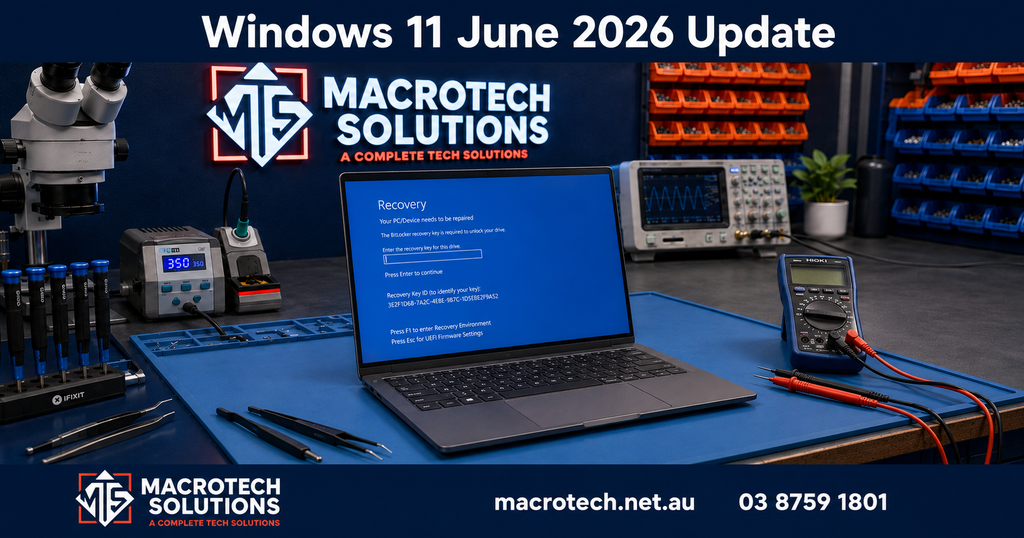
What's happening with the Windows 11 June 2026 update?
If your Windows 11 PC stopped working after updating this week, you are not alone. Microsoft released its June 2026 Patch Tuesday update on 9 June 2026 — officially known as KB5094126 — and it has caused serious problems for a significant number of users. On 21 June 2026, Microsoft formally confirmed it is aware of multiple active issues with the update.
The problems range from mild inconvenience (a broken Recycle Bin, OneDrive not appearing in File Explorer) to serious failures that prevent your computer from starting at all.

What are the symptoms?
Blue screen of death (error 0xc0430001)
Some PCs are rebooting into a blank black or blue screen with the stop code 0xc0430001. This is caused by a Secure Boot certificate update that ships with KB5094126. On machines with a small EFI (boot) partition — which includes many older Windows 11 laptops and desktops, often with only 100 MB of EFI space rather than the newer 500 MB–1 GB layout — Windows cannot write the files it needs. When that write fails, Secure Boot blocks the operating system from loading entirely.
HP laptops, particularly the EliteBook 840 G10 and similar business models, appear to be among the most commonly affected, though reports are coming in from a wide range of makes and models.
BitLocker recovery screen on startup
BitLocker is the built-in Windows encryption feature that protects your data. After installing KB5094126, some PCs restart directly into the BitLocker recovery screen, asking for a 48-digit recovery key before Windows will load. If you do not have that key stored somewhere accessible, you cannot get into your computer.
This has been a recurring problem with Windows updates in 2026. The April 2026 update caused a similar wave of BitLocker lockouts, and Microsoft only released a full fix with the May 2026 update (KB5089549). The June update has re-triggered the problem for some users, particularly those on HP hardware.
OneDrive broken in File Explorer
A separate but confirmed issue sees OneDrive disappearing from the left panel of File Explorer. Microsoft has confirmed this bug and says a fix is expected in the July 2026 Patch Tuesday update. Re-enabling UAC (User Account Control) resolves this without needing to uninstall the update.
Office and third-party apps crashing
Some third-party applications that use OLE automation to open Microsoft Office files — such as document management or ERP software — are crashing after the June update. Microsoft is investigating this issue.
Why does the June 2026 update cause these problems?
The root cause of the blue screen and BitLocker issues lies in how KB5094126 handles Secure Boot. This update refreshes the Secure Boot certificate database and writes new boot components to the EFI system partition. On older machines where that partition is only 100 MB, there may not be enough free space to write these new files.
When the write fails partway through, Secure Boot detects that the boot environment is in an inconsistent state and refuses to proceed — which produces the 0xc0430001 black screen, or triggers BitLocker to demand a recovery key as a security measure.
Microsoft has acknowledged that improving Secure Boot was a deliberate goal of this update, and that the process of rolling it out involves targeting devices that have demonstrated successful update readiness. Unfortunately, some machines slipped through that targeting process.
What can you try yourself?
Step 1 — Find your BitLocker recovery key
If your computer is showing a BitLocker recovery screen, the first thing you need is your recovery key. Try these locations:
- Your Microsoft account — visit account.microsoft.com/devices/recoverykey on a different device (phone, tablet, or another computer) and log in with the same Microsoft account you use on the affected PC. Your recovery key is often stored here automatically.
- A printout — if you printed your recovery key when you set up BitLocker, check your filing cabinet or anywhere you store important documents.
- Your IT department or employer — if this is a work computer managed by your organisation, your IT team may be able to retrieve it from Azure Active Directory.
Step 2 — Try disabling Secure Boot in BIOS
If your PC is showing a blue screen (0xc0430001) rather than the BitLocker screen, the recommended workaround from Microsoft is:
- Power off the computer completely.
- Power it back on and immediately press the key to enter BIOS/UEFI settings (commonly F2, F10, F12, or Delete — check your laptop's manual).
- In the BIOS, find the Secure Boot setting and disable it.
- Save and exit. Windows should now boot.
- Once Windows is running, allow the update to complete fully.
- Return to BIOS and re-enable Secure Boot.
This is a workaround, not a permanent fix. The July 2026 Patch Tuesday update is expected to address the underlying issue.

When to stop and call a professional
Stop and seek expert help if:
- You cannot find your BitLocker recovery key
- Disabling Secure Boot does not allow Windows to boot
- Your PC is showing a black screen with no error code
- You are worried about important files or data on the machine
- This is a business computer that needs to be back online urgently
Attempting further steps without the right knowledge can result in permanent data loss.
What about Windows 10 users?
Windows 10 users received their own June 2026 Patch Tuesday update (KB5093998) and have not been affected by the same EFI/Secure Boot issues in large numbers. However, it is worth noting that Windows 10 reached its official end of support on 14 October 2025 — meaning it no longer receives security updates from Microsoft. If you are still running Windows 10, your PC is increasingly vulnerable to security threats regardless of this particular update. Now is a good time to discuss upgrading to Windows 11 or replacing an ageing machine.
September 2026 Update: A New, Separate Round of Update Problems
Three months on, a different Windows 11 update has introduced its own confirmed issues — unrelated to the Secure Boot/BitLocker problem above, but worth knowing about if your PC has started behaving oddly recently. Both are confirmed on Microsoft's own release-health page as of early September 2026, with no permanent fix yet.
Desktop background turns black and cursor settings reset (KB5120998)
Following Windows updates released from 27 August 2026 (KB5120998) onward, some PCs are losing their desktop background — it reverts to a plain black colour — and custom mouse cursor and cursor-animation settings are being reset to default. Manually restoring these settings does not work, because the underlying settings file is failing to load correctly. Microsoft has confirmed both issues and says a fix is coming in a future update, but has not given a date.
This is purely cosmetic and does not affect how your PC actually runs — if your background has gone black or your cursor has changed, your files and programs are unaffected. There is currently no reliable permanent workaround; reapplying your background or cursor settings will not hold until Microsoft ships a fix.
False "Microsoft Defender Antivirus is turned off" notifications
Separately, after installing recent Microsoft Defender Antivirus updates, some PCs are showing notifications claiming Defender is turned off — even though it is running normally and every setting shows it as active. Microsoft has confirmed this is a notification bug, not an actual protection gap. If you see this alert, open Windows Security → Virus & threat protection to confirm your protection status directly rather than relying on the pop-up.
Macrotech Solutions can help — Carrum Downs and southeast Melbourne
If your Windows 11 PC has stopped working after the June 2026 update, Macrotech Solutions can diagnose and resolve the issue quickly. We are an independent repair centre based at 50 Titan Drive, Carrum Downs, serving customers across Carrum Downs, Frankston, Cranbourne, Lyndhurst, Langwarrin, Seaford, Skye, Patterson Lakes and surrounding southeast Melbourne suburbs.
Our technicians can:
- Access and recover data before attempting any system repair
- Retrieve BitLocker recovery keys where possible, or advise on data recovery if the key is unavailable
- Resolve blue screen and boot loop issues caused by failed Windows updates
- Expand EFI partitions to prevent recurrence of this class of problem
- Reinstall Windows cleanly if required, restoring your PC to full working order
Is your PC not starting after a Windows update?
Don't risk losing your data by attempting a reinstall without help. Bring it to Macrotech Solutions and we'll get it sorted.
View our computer repair servicesFrequently Asked Questions
Macrotech Solutions is an independent repair centre and is not affiliated with Microsoft or any PC manufacturer. Information in this article was originally published 22 June 2026 and updated 8 September 2026 with the KB5120998 and Defender notification issues; it is provided for general guidance only. Always back up your data before making changes to your system.