

Windows 11 Secure Boot Certificates Are Expiring — Here's What You Need to Do
If you've noticed a yellow or red warning next to "Secure Boot" in the Windows Security app recently, it's not a false alarm and it's not malware — it's part of a genuine, long-planned certificate changeover that every major PC manufacturer has spent the last few months preparing customers for.
Here's what's actually happening, why it matters, and — because a small number of BIOS updates tied to this rollout have caused real problems — what to check before you let your PC update itself.
Update — 12 July 2026: Microsoft has temporarily paused the Secure Boot certificate update on some PCs. If Windows Security now shows a message saying certificate updates are paused because of a known issue, don't try to force the update and don't turn Secure Boot off. In Microsoft's words: "Secure Boot certificate updates are temporarily paused while Microsoft and partners work toward a supported resolution." Affected devices need a firmware update from their manufacturer, which will arrive through the maker's standard update channel. Your PC keeps starting normally and receiving regular Windows updates in the meantime — it just can't apply the newest boot-level protections until the fix lands.
What's actually happening
Secure Boot is a UEFI firmware feature that runs before Windows even loads. It checks that your PC is only booting software that hasn't been tampered with. That system has been backed by Microsoft certificates issued back in 2011 — and those certificates are now expiring, in three stages:
- 🔐 Microsoft Corporation KEK CA 2011 — expired 24 June 2026
- 🔐 Microsoft UEFI CA 2011 — expired 27 June 2026
- 🔐 Microsoft Windows Production PCA 2011 — set to expire 19 October 2026
Microsoft has been rolling out replacement 2023 certificates via Windows Update since earlier this year, and pushed the certificates to all remaining eligible devices in June 2026 ahead of the deadline. For most regular users, this has already happened automatically and nothing further is needed. The process also depends on each manufacturer shipping a compatible BIOS/firmware update for older hardware, though — which is where things get more involved for some PCs.
How to check your PC's status
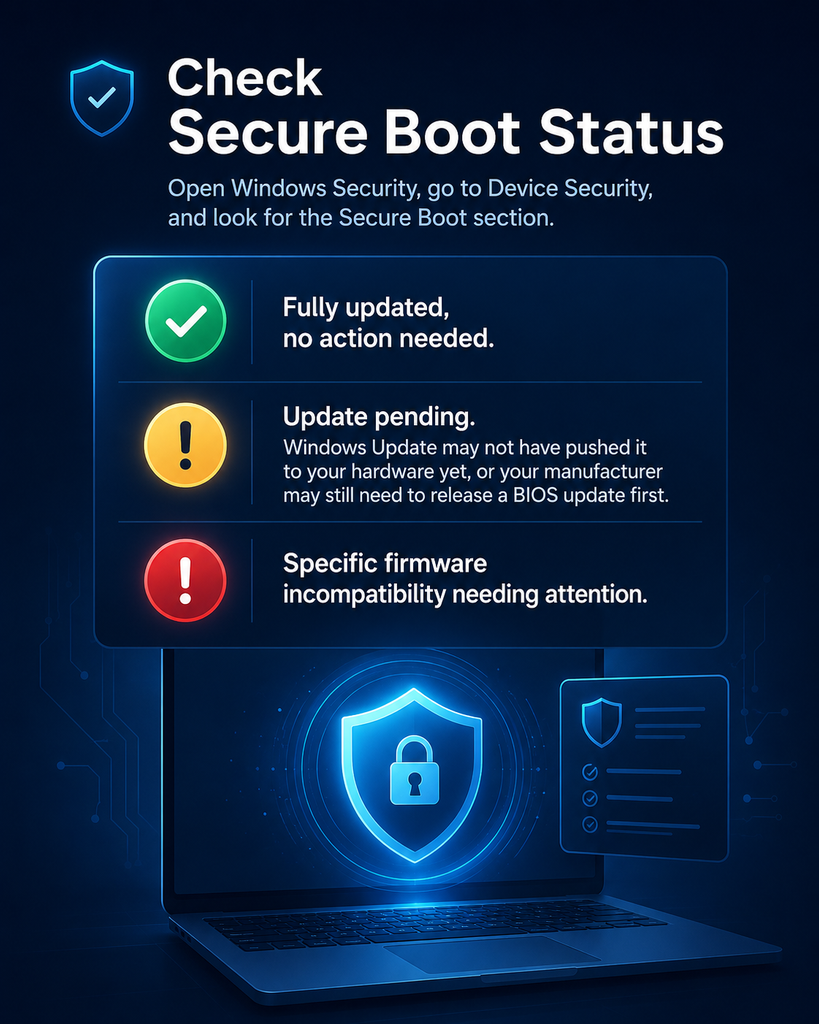
Open the Windows Security app, go to Device Security, and look for the Secure Boot section:
You're fully updated, no action needed.
Update pending — Windows Update hasn't reached your hardware yet, your manufacturer needs to release a BIOS update first, or (as of July 2026) Microsoft has temporarily paused the update for your device because of a known issue.
A specific firmware incompatibility that needs attention.
Secure Boot may be disabled, or the PC is on unsupported/bypassed hardware.
Windows 10 users aren't left out either — May 2026's KB5087544 update added the same green/yellow/red status reporting to Windows 10's Security app.
What each manufacturer is telling customers
ASUS
Most users update automatically; manual PowerShell/registry steps published for stragglers, plus a model list for commercial PCs shipping with 2023 certificates pre-installed.
Dell
Devices with End of Service Life before 1 Jan 2026 won't get a BIOS update. New platforms since late 2024 ship with both 2011 and 2023 certificates.
HP ⚠️
Consumer PCs update via Windows Update; commercial PCs need a specific minimum BIOS version. HP's own early-2026 BIOS updates caused BitLocker recovery loops on some premium commercial models — corrected versions now available.
Lenovo
Detailed BIOS download guide by product family (ThinkPad, IdeaPad, Legion, Yoga etc.), with direct links per model.
Acer
Automatic via Windows Update for supported models; some older models (circa 2020–2022) are reportedly stuck with no BIOS update currently available.
MSI
Older Intel/AMD platforms update via Windows Update only; newer 12th-gen-and-up platforms need a BIOS flash from MSI.
Samsung / LG / Surface
Each has published dedicated guidance; Surface devices update via the standard Microsoft firmware pipeline.
Worth knowing before you touch anything: HP has publicly acknowledged that some of its own early-2026 BIOS updates for premium commercial laptops triggered BitLocker recovery loops and boot failures. HP has since issued corrected BIOS versions, but if you have an HP business laptop, it's worth confirming you're on the corrected firmware before installing anything further — and backing up your BitLocker recovery key regardless of brand.
What to do before you update anything
- Check your Secure Boot status first in Windows Security > Device Security, so you know whether you actually need to do anything.
- Back up your BitLocker recovery key before installing any manufacturer BIOS update — several OEM guides (Acer and MSI included) now recommend this as step one, precisely because a BIOS update can occasionally trigger a BitLocker recovery prompt on the next restart.
- Find your specific model's guide on your manufacturer's support site rather than applying a generic fix — the correct BIOS version and update path differs by model and even by manufacturing year.
- If your device shows End of Service Life and isn't getting a BIOS update, it can generally keep running normally — you'll simply stop receiving future boot-level security patches on that specific certificate chain, which is worth factoring into your next upgrade decision.
When it's worth getting help
Most home users won't need to do anything beyond checking the Windows Security app. It's more likely to be worth a professional look if you're managing several business laptops running BitLocker, an older device has no manufacturer BIOS update available, or a PC lands on a BitLocker recovery screen or boot failure straight after a firmware update.
We're fielding a steady stream of these questions from customers around Carrum Downs, Frankston, Cranbourne, Lyndhurst, Langwarrin, Seaford, Skye and Patterson Lakes this month — mostly small businesses running older HP and Dell fleets. If that's you, we're happy to check it: book a diagnostic or call (03) 8759 1801.
A $50 diagnostic fee applies to hardware-related diagnosis (waived if you proceed with the repair).
Frequently asked questions
Do I need to do anything right now?
Most users don't — Microsoft pushed the 2023 certificates to all eligible devices via Windows Update in June 2026. Check Windows Security > Device Security for a green checkmark to confirm.
What does a yellow or red warning mean?
Yellow means the update hasn't reached your device yet, often because your manufacturer needs to release a BIOS update first. Red indicates a specific firmware incompatibility that needs manual attention.
Will this update wipe my files or break my PC?
No, the certificate update itself doesn't touch your files. The risk is narrower and specific: a small number of manufacturer BIOS updates tied to this rollout (notably some early-2026 HP updates) have triggered BitLocker recovery prompts. Having your recovery key on hand avoids any drama if that happens.
My old PC shows "Secure Boot unavailable" — is that a problem?
It usually means Secure Boot is disabled or the device is on unsupported/bypassed hardware. It's not an emergency, but it does mean the device won't benefit from ongoing boot-level security improvements.
Where can I find my manufacturer's specific guide?
Check your PC brand's official support site directly — ASUS, Dell, HP, Lenovo, Acer, MSI, Samsung and LG have each published a dedicated Secure Boot certificate page with model-specific instructions (see sources below).
Sources
- Microsoft Support — "If you're prevented from updating Secure Boot certificates", updated July 2026 — primary source for the temporary pause on devices affected by known issues (section added 12 July 2026).
- Windows Latest — "Microsoft confirms Secure Boot update failing on some Windows 11 PCs, blocks update due to known issues", published 10 July 2026 — reporting that first surfaced the pause.
- Windows Latest — "OEMs reveal Windows 11 Secure Boot fix after deadline passes", published 29 June 2026 — primary source for certificate expiry dates and manufacturer-by-manufacturer guidance summarised above.
- Windows Latest — "Windows 11 Secure Boot update released to all hours ahead of expiry", published 24 June 2026 — confirms Microsoft's June 2026 rollout to all eligible devices.
- Windows Latest — referenced within the source above: HP's acknowledged BIOS/BitLocker issue, reported 26 May 2026 — used for the HP-specific note above.