

MacBook Neo Won't Turn On or Charge? Battery, USB-C Board or Logic Board
Macrotech Solutions is an independent repair centre and is not affiliated with, authorised by or endorsed by Apple Inc.
The MacBook Neo has been on sale in Australia since March 2026, and like any laptop it's now starting to show up with the familiar problems: it won't power on, it won't charge, or it starts and then stalls. Apple has published service troubleshooting guides for the Neo, including a "No Power" guide updated in November 2026. They're useful for owners too, as long as you know which steps are safe to do at home and which belong on a repair bench.
Here's what to check, what the results mean, and when it's time to bring it in.
First, is it really dead? (The trackpad click trap)
On many older MacBooks, a trackpad that won't "click" was a quick hint that the machine had no power. That doesn't work on the MacBook Neo. Apple's own troubleshooting guide warns: "Don't rely on trackpad clicking to verify power in this model." The Neo uses a mechanical trackpad that clicks whether the laptop has power or not.
Better signs of life are:
- a sound when you connect the charge cable, or
- anything at all on the built-in display, including a faint backlight.
If you see either, your Neo isn't "dead". It has a startup problem, which is a different (and often easier) fix. Skip to It turns on but won't finish starting up below.
Five safe checks you can do at home
1. Use the right charger and cable
Apple notes that some USB-C adapters and cables look alike but don't deliver enough power. A phone charger, a cheap cable or a hub can leave a flat Neo unable to start. Try a genuine Apple USB-C adapter and the cable that came with the laptop, plugged straight into a wall socket. The Neo has two USB-C ports and both support charging, so try the other port too.
2. Look at (don't poke) the USB-C ports
Lint, grit and bent contacts are common, especially for laptops that live in school bags. Shut the laptop down and unplug it, then look inside each port with a torch. Apple's advice is to clean only with a clean, dry, soft, non-metallic brush. No pins, paperclips, compressed air, liquids or sprays. If a port looks bent, loose or scorched, stop there. It needs a repair, not more cleaning.
3. Make sure it's actually off, then power it on
A Neo that "won't wake" is sometimes stuck in a hung state with a black screen. Hold the power button for about 10 seconds, release it, wait a few seconds, then press it once normally. (On Touch ID models, the power button is the Touch ID sensor.)
4. Give a flat battery time
A deeply flat battery may need a while before the laptop will even try to start. Apple's guides suggest charging for at least 10 minutes with a compatible adapter, and its No Power guide allows at least 30 minutes before deciding the battery isn't the issue. Leave it connected to a known-good charger for half an hour, then try again.
5. Think back: any spill, drop or swelling?
Every one of Apple's Neo guides starts with the same step: check for liquid damage. A small spill can short circuits days or weeks later as corrosion builds up. If there's been any spill, don't keep plugging it in. Read our guide on what to do in the first hour after a spill and get it checked. If the bottom case is bulging, the trackpad is raised or the laptop no longer sits flat, the battery may be swelling. Stop charging it and read our guide to swollen MacBook batteries. If you notice a burning smell, see what to do when a laptop smells like burning.
It turns on but won't finish starting up
If you hear the charging sound or see the screen light up but it never reaches the login window, or you see a flashing exclamation point in a circle, Apple treats this as a startup issue, not a power issue (Apple's Neo startup guide). Try starting in Safe Mode. If that fails, Apple's next step (before replacing any hardware) is to revive or restore the Mac's firmware using a second Mac. A firmware restore erases the internal storage, so if your data isn't backed up, talk to us before anyone attempts it. Our guide to revive vs restore explains the difference.
Our article on the flashing question mark folder covers related startup symptoms, and which macOS version your Mac should be on explains update-related problems.
What's happening inside: the three usual culprits
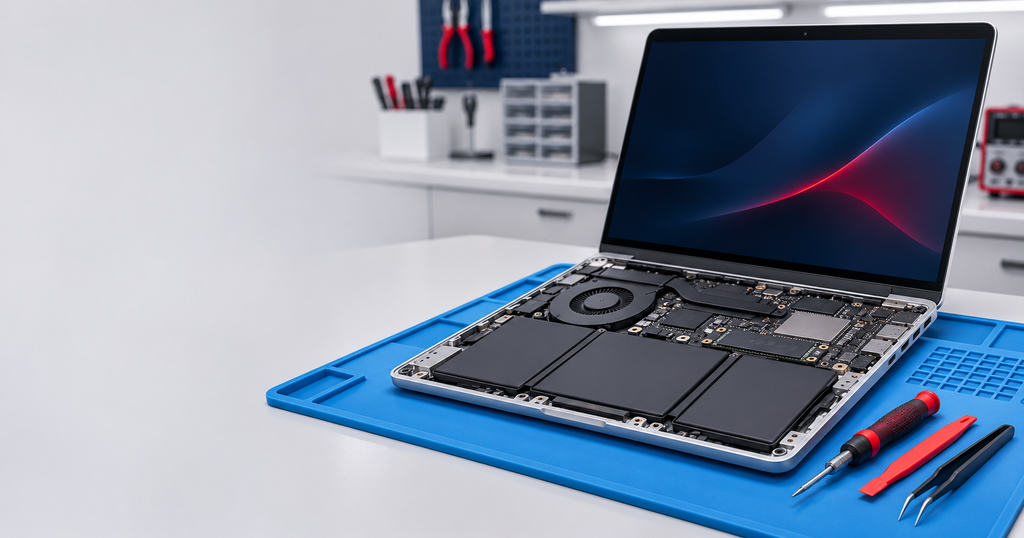
Apple's service guides for the Neo follow a clear order once the bottom case is off. You shouldn't open the laptop yourself unless you're experienced. The battery must be disconnected first, and a punctured lithium battery is a genuine fire risk. But knowing the process helps you understand any quote you're given.
The battery
A technician disconnects the battery and tries to start the Neo on the charger alone. Apple's guide says if it starts only without the battery, a battery replacement is recommended. The Neo's battery is screwed in rather than glued, which makes this one of the more practical MacBook battery replacements Apple has made in years.
The USB-C boards and their flex cable
On the Neo, the USB-C ports are on separate small boards connected to the logic board by a flex cable, which may sit under the logic board. Apple's guide specifically says to confirm that cable is present and properly seated, and to replace the USB-C boards if the ports are damaged. A worn port or a disturbed cable can make the whole laptop look dead, and it's a much smaller repair than a logic board.
The logic board
If the battery, USB-C boards and cables all check out, Apple's guide ends with: "No specific fault identified: replace the logic board."
Why "replace the logic board" isn't always the answer
Apple's service process is designed around swapping whole parts. That's often the quickest path for Apple, but a replacement logic board is the most expensive part in the machine, and Apple itself notes that "replacing a part may not resolve the device's issue."
At component level, a "no power" board usually has a specific cause: a shorted capacitor on a power rail, a failed charging or power-management chip, or corrosion from a past spill. With a bench power supply, a thermal camera, a microscope and board-level measurements, these faults can often be found and repaired without replacing the board, with your data still on it. That's the work we do every day on MacBooks. See how microsoldering and component-level repair works and how a short circuit is traced.
We'll always tell you honestly when a repair isn't economical.
What about my data?
The Neo's storage is soldered to the logic board, so you can't simply pull out a drive and copy your files. That makes the board-repair-versus-replacement question important: a replacement board comes with blank storage, while repairing the original board can bring your files back with it. If your Neo isn't backed up to iCloud or Time Machine, tell us before any work starts. See our data recovery service.
MacBook Neo repairs in Carrum Downs and southeast Melbourne
If you've tried the five safe checks and your Neo still won't power on, charge or start up, bring it to our workshop at 50 Titan Drive, Carrum Downs (Mon–Fri 10 am–5 pm, Sat 10 am–2 pm). We diagnose before we quote, starting with the cheapest likely cause (charger, port, cable or battery) before looking at the logic board. A $50 diagnostic fee applies to hardware-related diagnosis and is credited toward the repair if you proceed.
We see MacBooks from Carrum Downs, Frankston, Cranbourne, Seaford, Langwarrin, Skye, Patterson Lakes, Lyndhurst and across southeast Melbourne, and offer mail-in repairs for customers further away. Call 03 8759 1801, see our Mac repairs page or book a diagnostic online. For more on the model itself, read MacBook Neo: Apple's most repairable laptop in 14 years.
FAQs
Why does my MacBook Neo trackpad still click when the laptop is dead?
The Neo uses a mechanical trackpad that clicks without power. Apple says not to use the click to check for power. Look for the charging sound or any light on the screen instead.
How long should I charge a dead MacBook Neo before giving up?
Use a genuine Apple adapter and cable plugged into the wall and leave it for at least 30 minutes. If there's still no charging sound or display, it needs a diagnosis.
Can a faulty USB-C port stop a MacBook Neo turning on?
Yes. The ports sit on separate USB-C boards connected by a flex cable. A damaged port or loose cable can stop the laptop charging or powering on, and is usually a smaller repair than the logic board.
Is the MacBook Neo battery replaceable?
Yes. It's held in with screws rather than adhesive, which makes replacement more practical than on many recent MacBooks. It should be done by someone experienced, as the battery must be disconnected safely first.
Will I lose my data if the logic board is replaced?
Usually, yes. The storage is soldered to the logic board, so a replacement board starts blank. A board-level repair of your original board can often preserve your data.
Should I take my MacBook Neo to Apple or an independent repairer?
If it's under warranty or AppleCare, contact Apple first. Out of warranty, an independent repairer can offer component-level repair as an alternative to whole-board replacement.
Macrotech Solutions is an independent repair centre and is not affiliated with, authorised by or endorsed by Apple Inc. MacBook and MacBook Neo are trademarks of Apple Inc., used only to identify the products we repair. If your MacBook Neo is under Apple's warranty or AppleCare, contact Apple first, as independent repair may affect warranty coverage. A fixed $50 diagnostic fee applies to hardware-related diagnosis and is credited toward the repair cost if you proceed.