

Fake ATO and myGov Emails Are Circulating This Tax Time — How to Spot Them and What to Do If You Clicked
July is the busiest month of the year for tax scams in Australia. With tax time 2026 under way, Scamwatch and the Australian Taxation Office have issued a fresh warning about emails, texts and calls impersonating the ATO and myGov — and some of the fakes landing in inboxes around Carrum Downs and southeast Melbourne are convincing enough to fool careful people. Below you'll see real examples of these scam emails, straight from the ATO's own alerts, so you know exactly what to look for.
Here's what the current scams look like, the warning signs to check before you click, and — because plenty of people only search for help after clicking — exactly what to do if you've already followed a link or entered your details.
Why tax time is scam season
Scammers follow the calendar. Between July and October, millions of Australians are expecting genuine messages about tax returns and refunds, so a fake "your return is ready" email doesn't raise the suspicion it would in March. Scamwatch's 26 June 2026 alert notes that criminals use official logos, branding and language, and manufacture urgency to push you into clicking links to fake websites or downloading harmful attachments. Everyone is a target — including people who aren't required to lodge a return at all.
What the current scams look like — real examples
One of the most convincing fakes is a DocuSign-styled email carrying a document called "Declaration and Final Release", often with "notice of assessment" wording in the subject line. The ATO first flagged this scam in October 2025, and it's still circulating as tax time 2026 gets under way. This is what it actually looks like:
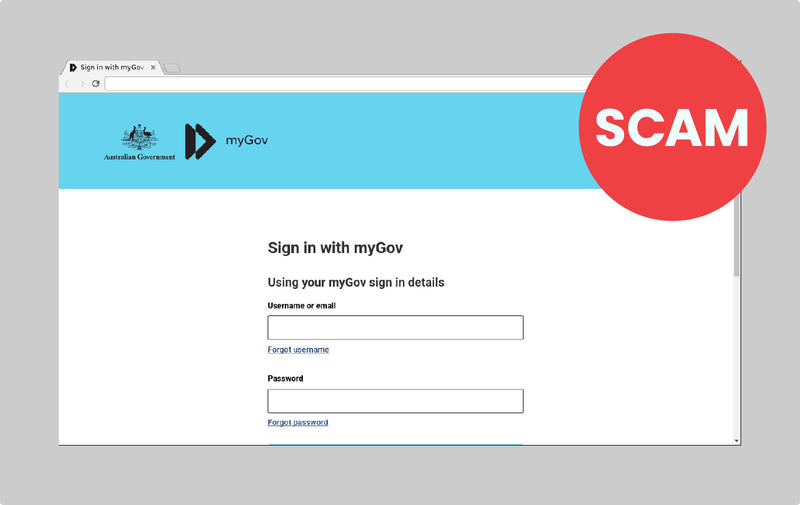
The email looks like a genuine DocuSign message — but its "Review Document" button leads to a counterfeit myGov sign-in page built to steal your username, password, name, date of birth and driver's licence details. Here's the fake sign-in page itself:
With those details, criminals can attempt to redirect your tax refund, steal superannuation and commit identity fraud in your name. Worth remembering: the ATO says it will never use DocuSign to finalise a tax refund.
Another variant the ATO has flagged (February 2026) is a cryptocurrency email demanding you "declare" holdings in a so-called non-KYC wallet by phoning a number in the email — alongside the perennial refund-notification emails, SMS messages with sign-in links, and phone calls threatening penalties unless you act immediately:
Four warning signs to check before you click
1. Urgency + personal details
Unexpected requests for personal or financial information, especially with a deadline, threat or "act now" pressure attached.
2. Any unsolicited ATO link
An out-of-the-blue message with a link claiming to be from the ATO. The ATO simply does not send these.
3. Sign-in via a link
The link wants you to sign in to your myGov account. Genuine ATO messages never work this way — type my.gov.au yourself.
4. Sender isn't .gov.au
Sender details that don't end in .gov.au — or don't match the agency the message claims to be from (like "Australian Taxation Government Office" above).
If a message fails any one of these checks, don't click. To verify something is real, contact the ATO through the official app, website (type ato.gov.au yourself) or on 1800 008 540.
What to do if you already clicked
No shame here — these pages are designed by professionals. What matters is acting quickly, in the right order.
If you clicked the link but entered nothing
- Close the browser tab. Don't press any buttons on the page, and don't download anything it offers.
- Run a full antivirus/anti-malware scan on the computer.
- Watch the machine over the next few days for redirects, new pop-ups, unfamiliar programs or sudden slowness — these can indicate something installed itself.
If you entered your myGov or bank details
- Use a different, clean device (another computer or your phone) to change your myGov password immediately. Changing it on the compromised machine can hand the new password straight to the scammers.
- Call the ATO on 1800 008 540 so they can put protective measures on your tax accounts.
- Contact your bank straight away if card or account details were entered.
- Contact IDCARE on 1800 595 160 — Australia's free identity-theft support service.
- Report the scam: forward the email to ReportScams@ato.gov.au, then delete it. You can also report at Scamwatch.
- Have the computer professionally checked before trusting it again — see below.
Why the computer itself needs checking
Most people focus on the stolen password and forget the machine. But fake sign-in pages are increasingly paired with malware: browser extensions that harvest everything you type, remote-access tools, and info-stealers that quietly export saved passwords. If any of those made it onto your laptop, changing passwords from that same laptop achieves nothing — the new ones are stolen too.
A professional malware check covers what a quick antivirus scan can miss: startup items and scheduled tasks, browser extensions and hijacked settings, unfamiliar remote-access software, and whether saved credentials in the browser were exposed. It's the same category of threat as the fake-CAPTCHA "ClickFix" scam we covered recently, which tricks people into installing an info-stealer with three keystrokes — tax-time phishing and ClickFix pages frequently lead to the same families of malware.
Local help in Carrum Downs and southeast Melbourne
If you've clicked a suspicious tax-time link — or your computer has been acting strangely since — bring it in to Macrotech Solutions at 50 Titan Drive, Carrum Downs. We run thorough malware and security checks on Windows laptops and desktops and Macs, clean out anything that shouldn't be there, and make sure your browser and saved passwords are safe to use again. We help customers across Carrum Downs, Frankston, Cranbourne, Lyndhurst, Langwarrin, Seaford, Skye and Patterson Lakes — and if your machine turns out to be clean, we'll simply tell you so.
Worried about a link you clicked? Call 03 8759 1801 — Monday to Friday 10 am–5 pm, Saturday 10 am–2 pm — or drop in for a security check.
Frequently asked questions
How do I know if an ATO email is fake?
The quickest giveaway is a clickable sign-in link — the ATO does not send unsolicited messages asking you to sign in to myGov via a link. Also check the sender address: legitimate government addresses end in .gov.au. Urgency, threats or refund promises are classic pressure tactics. When in doubt, don't click — open the ATO app or type my.gov.au into your browser yourself.
I clicked the link but didn't enter any details — am I safe?
Usually clicking alone is lower risk than entering credentials, but it isn't zero risk — some scam pages attempt to run malicious scripts or push downloads. Close the page, run a full antivirus scan, and watch for unusual behaviour like pop-ups, redirects or slowness. If anything seems off, get the computer checked.
I entered my myGov details on a fake page — what should I do?
Act quickly. From a different, clean device change your myGov password, then call the ATO on 1800 008 540 so they can protect your tax accounts. Contact your bank if financial details were involved, and IDCARE (1800 595 160) for identity-theft support. Have the computer checked for malware before signing in to anything important on it again.
Can a scam email infect my computer just by opening it?
Simply reading a plain email rarely infects a modern computer. The danger is in what comes next — clicking links, opening attachments, or following instructions such as pressing Windows+R to paste a command (the ClickFix scam). If you've downloaded an attachment from a suspicious tax-time email, don't open it — have the machine scanned.
Does Macrotech check Macs as well as Windows computers for malware?
Yes. Scam pages and credential-stealing malware target both platforms. We check and clean Windows laptops and desktops, MacBooks, iMacs and Mac minis at our Carrum Downs workshop — and we'll tell you honestly if your machine is clean.
Macrotech Solutions is an independent computer repair centre in Carrum Downs and is not affiliated with the Australian Taxation Office, Services Australia (myGov), Apple, Microsoft or any device manufacturer. This article is general security information, not financial or legal advice. Scam example images are © Commonwealth of Australia (Australian Taxation Office), reproduced from the ATO scam alerts page for consumer-awareness purposes. Scam details are current as at July 2026 — always check ato.gov.au and scamwatch.gov.au for the latest alerts.