

MacBook Screen Flickering, Dim or Showing "Stage Lights"? What It Means and How It's Fixed
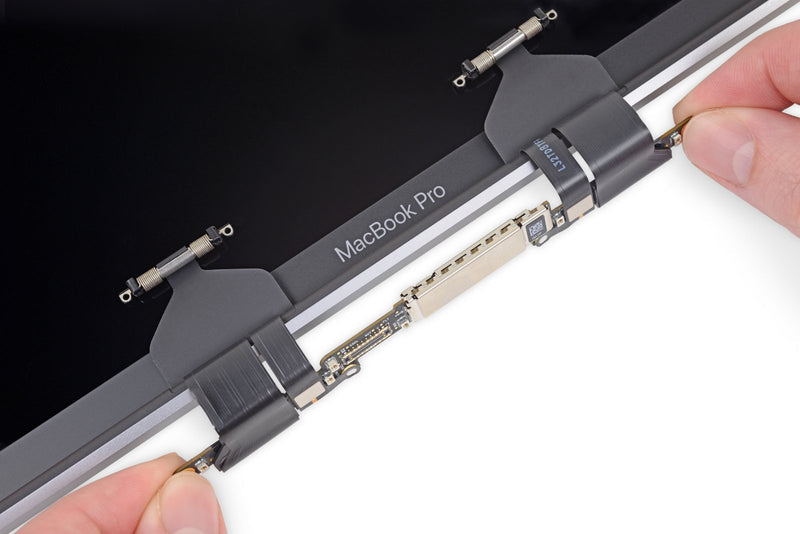
A MacBook screen that flickers, dims for no reason or lights up like a theatre stage along the bottom edge is one of the most common Mac faults we see at our Carrum Downs workshop — and one of the most misunderstood. Some of these problems are a five-minute settings fix. Others are a worn flex cable or a backlight circuit fault that will only get worse. Here's how to tell the difference before you pay for anything.
Symptom decoder: what your screen is telling you
Flicker that changes with lid angle
Image or backlight cuts out past a certain opening angle. Likely cause: worn display/backlight flex cable — the classic "flexgate" pattern.
"Stage lights" along the bottom
Alternating bright and dark patches at the bottom edge. Likely cause: partially torn backlight flex cable — usually progresses to total backlight failure.
Dim screen at full brightness
Everything works but the image is dark even at 100%. Likely cause: backlight driver circuit or fuse fault on the logic board.
Black screen, but the Mac is on
Fans spin, keyboard lights up, sound works. Shine a torch at the screen — if you can faintly see the desktop, the backlight has failed but the panel is fine.
Lines, blocks or distortion
Vertical/horizontal lines or scrambled areas. Likely cause: damaged LCD panel, T-CON fault or a graphics problem on the logic board.
Random flicker at any angle
Comes and goes regardless of lid position, sometimes after an update. Likely cause: software settings, a loose connector — or early cable wear. Worth ruling out software first.
Try these software checks first
Five minutes here can save you a workshop visit. If the flicker is intermittent and doesn't follow the lid angle:
- Turn off True Tone and automatic brightness (System Settings → Displays). Sensor-driven brightness changes can mimic a flicker.
- Update macOS. Display driver bugs do happen, and point updates fix them.
- Restart in safe mode. If the problem vanishes there, the cause is likely software.
- On Intel MacBooks, reset the SMC and NVRAM — both can affect display behaviour. (Apple Silicon Macs manage this automatically with a normal restart.)
- Plug in an external monitor. If the external picture is perfect while the built-in screen misbehaves, the fault is in the display or its cables — not the graphics chip. If both screens misbehave, it points to the logic board.
What actually fails in the hardware
The backlight flex cable ("flexgate"). From 2016, MacBook Pro displays connect through thin ribbon cables that wrap over the display controller board and flex slightly with every open and close of the lid. iFixit documented how this design fatigues the backlight cable over time — the origin of the stage-light effect and angle-dependent blackouts. Apple quietly lengthened the cable in 2018 models and ran a Display Backlight Service Program (announced May 2019) for the 13-inch 2016 model, but that program only covered one model and has long since ended.
The backlight circuit on the logic board. The backlight is driven by a boost circuit on the logic board — a blown fuse, a failed driver chip or liquid damage in that area kills or dims the backlight even when the display itself is perfect. This is a logic-board repair, not a screen replacement — replacing the display won't fix it.
Connectors and corrosion. A display connector nudged loose, or corrosion creeping across it after a liquid spill, produces intermittent flicker, colour tints or blackouts that are easy to mistake for panel failure.
The panel itself. Cracks, pressure damage and dead rows show up as lines, blocks or distortion. This is the one case where a new display assembly is genuinely the only fix.
Repair options — honestly compared
Board-level / cable repair (microsoldering). Where the fault is the backlight cable, backlight circuit or a connector, a component-level repair under the microscope fixes the actual fault for considerably less than a full display assembly. It's the economical route for stage lights, angle-dependent blackouts and dim-screen faults — and the only correct route when the problem is on the logic board. The honest caveat: it isn't always possible; severity and model matter, which is why diagnosis comes first.
Display assembly replacement. The right fix for cracked or physically damaged panels, and sometimes the sensible one when a cable fault has progressed too far. Assemblies are the single most expensive Mac part, and prices vary widely by model and condition — which is exactly why it's worth confirming the fault is actually in the panel before paying for one.
One warning: if your screen problems started after a spill, power the Mac off and don't charge it — corrosion spreads while power is applied, and a repairable display fault can become a logic-board rebuild in days.
MacBook screen diagnosis in Carrum Downs
At Macrotech Solutions we diagnose the actual fault before quoting — under the microscope where needed — across all MacBook Air and MacBook Pro models, at 50 Titan Drive, Carrum Downs. Because we do board-level Mac repair in-house, you get a genuine choice between a targeted cable/circuit repair and a display replacement, not a one-size-fits-all quote. We help customers across Carrum Downs, Frankston, Cranbourne, Lyndhurst, Langwarrin, Seaford, Skye and Patterson Lakes.
Screen playing up? Call 03 8759 1801 — Monday to Friday 10 am–5 pm, Saturday 10 am–2 pm — or book a diagnostic online. A $50 diagnostic fee applies to hardware diagnosis and is waived if you proceed with the repair.
Frequently asked questions
Why does my MacBook screen only flicker or cut out at certain lid angles?
That pattern almost always points to a worn display flex cable. On 2016-era MacBook Pros the thin ribbon cables that carry display and backlight signals wrap over the display controller board and are stressed slightly every time the lid opens or closes. As the cable wears, certain lid angles pull on the damaged section — so the image or backlight cuts out past a certain angle. It's a hardware fault; software can't fix it.
What is the "stage lights" effect on a MacBook screen?
Stage lights are alternating bright and dark patches along the bottom edge of the screen, like footlights on a theatre stage. It means the backlight flex cable has partially failed — some backlight zones are still being driven while others aren't. Left alone it usually progresses to complete backlight failure, so it's worth repairing early.
Can a flickering MacBook screen be fixed without replacing the whole display?
Often, yes. If the fault is in the backlight flex cable, the backlight driver circuit or a connector, a component-level repair can fix it for considerably less than a full display assembly. If the LCD panel itself is cracked or damaged, a display replacement is the right fix. A proper diagnosis tells you which side of that line your Mac is on before you spend anything.
Is Apple's free flexgate repair program still running?
Apple's Display Backlight Service Program, announced in May 2019, covered only the 13-inch MacBook Pro (2016) and has long since ended. If your MacBook has backlight symptoms today, the realistic options are a paid repair through Apple or an independent repairer — independent board-level repair is usually the more economical route for backlight cable and circuit faults.
Could my screen problem be software rather than hardware?
Sometimes. Flicker that appears after a macOS update, or only in certain apps, can be software-related. Turning off True Tone and automatic brightness, updating macOS and testing in safe mode rules most of this out. Flicker or blackouts that change with lid angle, stage lights, or a dim screen at full brightness are hardware faults.
Macrotech Solutions is an independent computer and Apple repair centre in Carrum Downs and is not affiliated with, endorsed by or sponsored by Apple Inc. MacBook, MacBook Air and MacBook Pro are trademarks of Apple Inc. Background on the display flex-cable issue draws on published iFixit teardown reporting and Apple's May 2019 Display Backlight Service Program announcement; repair suitability always depends on the individual machine, which is why we diagnose before quoting.